The C++ Mathematical Expression Toolkit Library (ExprTk) is a versatile,
simple to use, easy to integrate and extremely efficient runtime mathematical expression parser and
evaluation engine. ExprTk supports numerous forms of functional, logical and vector processing semantics
and is very easily extendible.
Capabilities
The ExprTk library has the following capabilities:
When compiling and subsequently evaluating an expression with ExprTk, the following
three fundamental components will be encountered:
Component
Purpose / Details
exprtk::symbol_table<NumericType>
Holder of external variables, vectors, strings, constants and user defined functions
exprtk::parser<NumericType>
Expression factory
exprtk::expression<NumericType>
Holder of the AST which is used to evaluate the compiled expression
Note:NumericType can be any floating point
type. This includes but is not limited to: float, double, long double,MPFR
or any custom type conforming to an interface compatible with the standard floating point type.
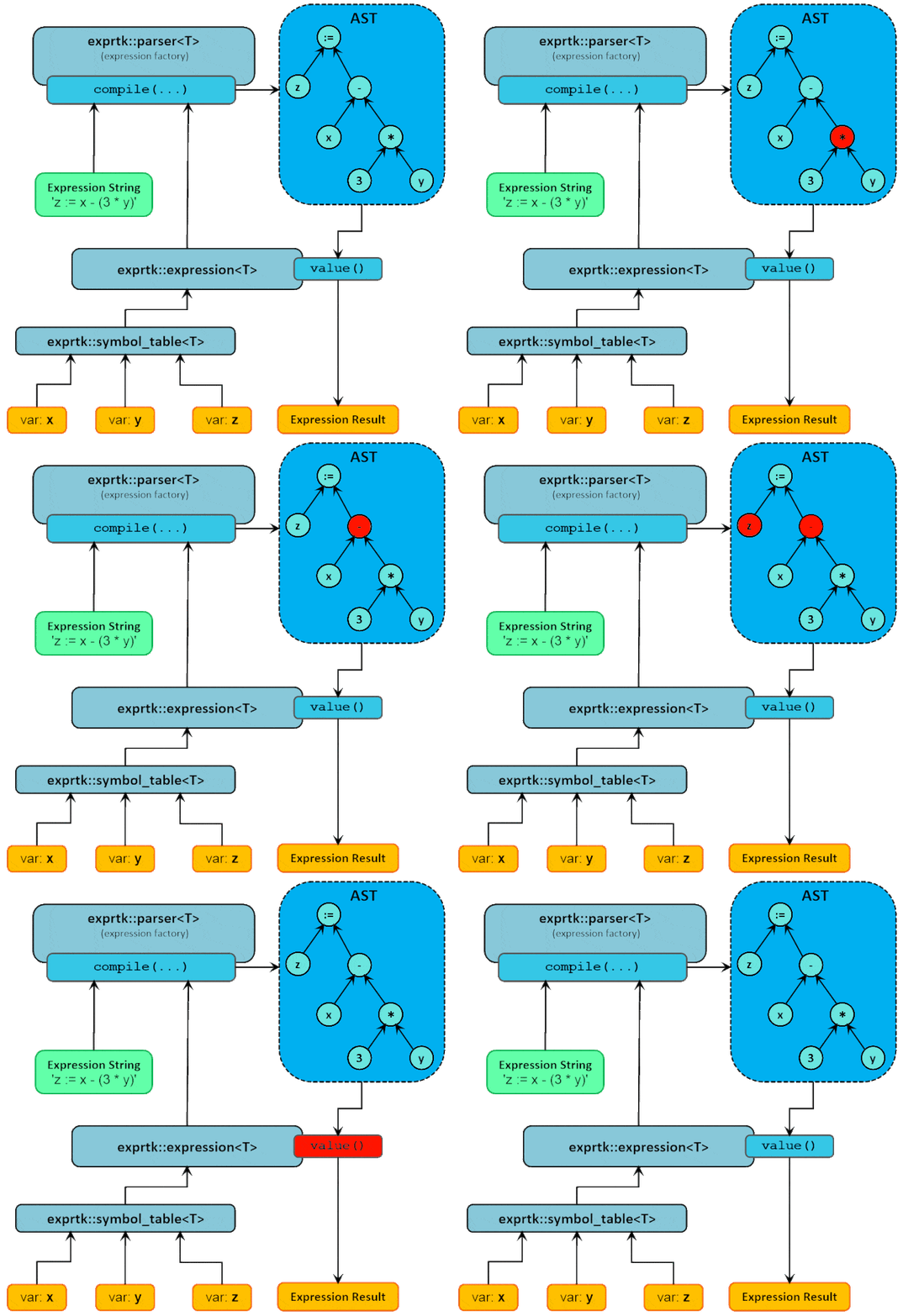
The following diagram depicts each of the above denoted components and how they relate to one another
when compiling and evaluating the expression: z := x - (3 * y)
The following example illustrates the events shown in the diagram above.
Given an expression string 'z := x - (3 * y)' and three variables
(x, y and z), a exprtk::symbol_table is instantiated and the variables
are added to it. Then an exprtk::expression is instantiated and the symbol table
is registered with the expression instance. Finally an exprtk::parser is instantiated
where both the expression object and the string form of the expression are passed to the
compile method of the parser.
If the compilation process is successful the expression instance will now be holding an AST that
can be used to evaluate the original expression. Otherwise a compilation error will be raised and
diagnostics relating to the error(s) made available via the parser's error reporting interface.
The expression in the example will perform a calculation using the variables x and y
then proceed to assign the result of the calculation to the variable z.
typedefdouble T;// numeric type (float, double, mpfr etc...)typedef exprtk::symbol_table<T> symbol_table_t;typedef exprtk::expression<T> expression_t;typedef exprtk::parser<T> parser_t;conststd::string expression_string ="z := x - (3 * y)";T x = T(123.456);T y = T(98.98);T z = T(0.0);symbol_table_t symbol_table;symbol_table.add_variable("x",x);symbol_table.add_variable("y",y);symbol_table.add_variable("z",z);expression_t expression;expression.register_symbol_table(symbol_table);parser_t parser;if(!parser.compile(expression_string,expression)){printf("Compilation error...\n");return;}T result = expression.value();....
The expression is evaluated by traversing the generated AST in a
postorder manner. The order of sub-expression evaluations will be
as follows:
Result0 <- (3 * y)
z <- (x - Result0)
For a more detailed discussion on the internals of ExprTk and its capabilities it is recommended
to have a review of the accompanying:
readme.txt
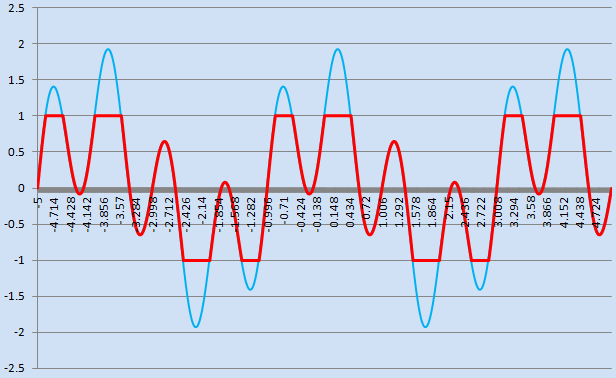
The following is an example where a given single variable function is evaluated
within the domain: [-5, +5].
The graph below shows the clamped
(red) and non-clamped
(blue) versions of the specified function.
The example further demonstrates the common use-case of ExprTk: which is to compile
an expression only once, and to then evaluate the compiled expression many times over,
and where between each evaluation the expression's dependent variables (eg: x variable)
are updated as needed.
[source: simple_example_01.cpp]
template<typename T>void trig_function(){typedef exprtk::symbol_table<T> symbol_table_t;typedef exprtk::expression<T> expression_t;typedef exprtk::parser<T> parser_t;conststd::string expression_string ="clamp(-1.0, sin(2 * pi * x) + cos(x / 2 * pi), +1.0)"; T x; symbol_table_t symbol_table; symbol_table.add_variable("x",x); symbol_table.add_constants(); expression_t expression; expression.register_symbol_table(symbol_table); parser_t parser; parser.compile(expression_string,expression);for(x = T(-5); x <= T(+5); x += T(0.001)){const T y = expression.value();printf("%19.15f\t%19.15f\n", x, y);}}
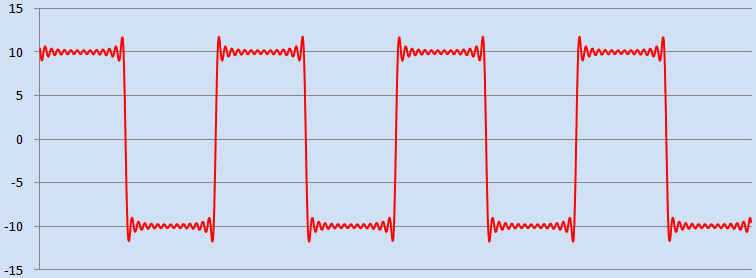
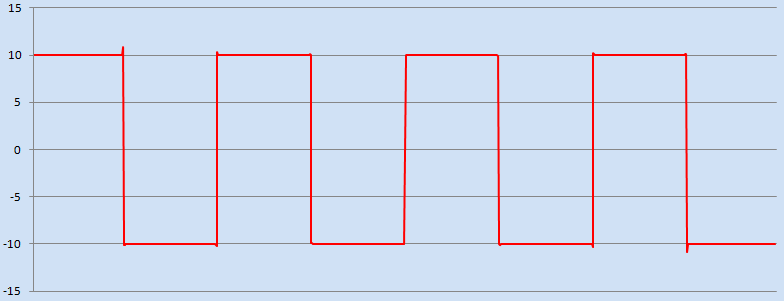
The following example generates a square wave
form based on Fourier series
accumulations - 14 harmonics. Sigma-approximation is not applied hence
Gibbs phenomenon based ringing is observed on the edges of the square,
as is demonstrated in the graph below.
[source: simple_example_02.cpp]
template<typename T>void square_wave(){typedef exprtk::symbol_table<T> symbol_table_t;typedef exprtk::expression<T> expression_t;typedef exprtk::parser<T> parser_t;conststd::string expression_string ="a *(4 / pi) * ""((1 /1) * sin( 2 * pi * f * t) + (1 /3) * sin( 6 * pi * f * t)+"" (1 /5) * sin(10 * pi * f * t) + (1 /7) * sin(14 * pi * f * t)+"" (1 /9) * sin(18 * pi * f * t) + (1/11) * sin(22 * pi * f * t)+"" (1/13) * sin(26 * pi * f * t) + (1/15) * sin(30 * pi * f * t)+"" (1/17) * sin(34 * pi * f * t) + (1/19) * sin(38 * pi * f * t)+"" (1/21) * sin(42 * pi * f * t) + (1/23) * sin(46 * pi * f * t)+"" (1/25) * sin(50 * pi * f * t) + (1/27) * sin(54 * pi * f * t))";staticconst T pi = T(3.141592653589793238462643383279502);const T f = pi / T(10);const T a = T(10); T t = T(0); symbol_table_t symbol_table; symbol_table.add_variable("t",t); symbol_table.add_constant("f",f); symbol_table.add_constant("a",a); symbol_table.add_constants(); expression_t expression; expression.register_symbol_table(symbol_table); parser_t parser; parser.compile(expression_string,expression);const T delta =(T(4)* pi)/ T(1000);for(t =(T(-2)* pi); t <=(T(+2)* pi); t += delta){const T result = expression.value();printf("%19.15f\t%19.15f\n", t, result);}}
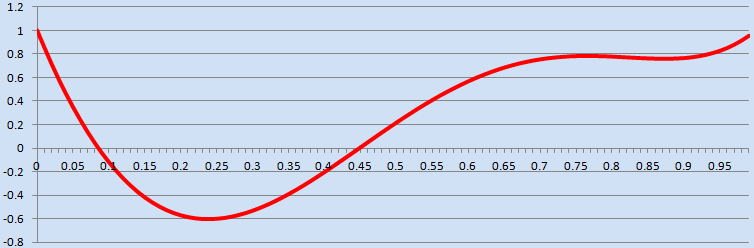
The following example evaluates a 5th degree polynomial within the domain [0,1]
with a step size of 1/100th. An interesting side note in the expression is how
the multiplication of the coefficients to the variable 'x' are implied rather
than explicitly defined using the multiplication operator '*'
[source: simple_example_03.cpp]
template<typename T>void polynomial(){typedef exprtk::symbol_table<T> symbol_table_t;typedef exprtk::expression<T> expression_t;typedef exprtk::parser<T> parser_t;conststd::string expression_string ="25x^5 - 35x^4 - 15x^3 + 40x^2 - 15x + 1";const T r0 = T(0);const T r1 = T(1); T x = T(0); symbol_table_t symbol_table; symbol_table.add_variable("x",x); expression_t expression; expression.register_symbol_table(symbol_table); parser_t parser; parser.compile(expression_string,expression);const T delta = T(1.0/100.0);for(x = r0; x <= r1; x += delta){printf("%19.15f\t%19.15f\n", x, expression.value());}}
The following example generates the first 40 Fibonacci
numbers using a simple iterative method. The example demonstrates the
use of multiple assignment and sequence points, switch statements,
while-loops and composited functions with expression local
variables.
[source: simple_example_04.cpp]
template<typename T>void fibonacci(){typedef exprtk::symbol_table<T> symbol_table_t;typedef exprtk::expression<T> expression_t;typedef exprtk::parser<T> parser_t;typedef exprtk::function_compositor<T> compositor_t;typedeftypename compositor_t::function function_t; T x = T(0); compositor_t compositor; compositor.add( function_t("fibonacci").var("x").expression(" switch "" { "" case x == 0 : 0; "" case x == 1 : 1; "" default : "" { "" var prev := 0; "" var curr := 1; "" while ((x -= 1) > 0) "" { "" var temp := prev; "" prev := curr; "" curr += temp; "" }; "" }; "" } ")); symbol_table_t& symbol_table = compositor.symbol_table(); symbol_table.add_constants(); symbol_table.add_variable("x",x);std::string expression_str ="fibonacci(x)"; expression_t expression; expression.register_symbol_table(symbol_table); parser_t parser; parser.compile(expression_str,expression);for(std::size_t i =0; i <40;++i){ x =static_cast<T>(i);const T result = expression.value();printf("fibonacci(%3d) = %10.0f\n",static_cast<int>(i), result);}}
The following example demonstrates how one can easily register a custom
user defined function to be used within expression evaluations. In this
example one of the custom functions myfunc takes two parameters
as input and returns a result, the other being a free function named myotherfunc
which takes three values as input and returns a result. Furthermore the
'myfunc' function explicitly enables itself for constant-folding
optimisations by indicating it is stateless and has no external side-effects.
The upper limit for individual parameters is 20 inputs. If more inputs are
required then either the ivararg_function or igeneric_function interfaces can
be used, both of which support an unlimited number of input parameters.
[source: simple_example_05.cpp]
template<typename T>struct myfunc final:public exprtk::ifunction<T>{ myfunc(): exprtk::ifunction<T>(2){ exprtk::disable_has_side_effects(*this);}inline T operator()(const T& v1,const T& v2)override{return T(1)+(v1 * v2)/ T(3);}};template<typename T>inline T myotherfunc(T v0, T v1, T v2){returnstd::abs(v0 - v1)* v2;}template<typename T>void custom_function(){typedef exprtk::symbol_table<T> symbol_table_t;typedef exprtk::expression<T> expression_t;typedef exprtk::parser<T> parser_t;conststd::string expression_string ="myfunc(sin(x / pi), otherfunc(3 * y, x / 2, x * y))"; T x = T(1); T y = T(2); myfunc<T> mf; symbol_table_t symbol_table; symbol_table.add_variable("x",x); symbol_table.add_variable("y",y); symbol_table.add_function("myfunc",mf); symbol_table.add_function("otherfunc",myotherfunc); symbol_table.add_constants(); expression_t expression; expression.register_symbol_table(symbol_table); parser_t parser; parser.compile(expression_string,expression); T result = expression.value();printf("Result: %10.5f\n",result);}
The following example demonstrates how one can evaluate an expression
over multiple vectors. The example evaluates the value of an expression
at the ith element of vectors x and y and assigns the value to the ith
value of vector z. The example demonstrates the use of vector indexing,
the vector 'size' operator and for loops.
[source: simple_example_06.cpp]
template<typename T>void vector_function(){typedef exprtk::symbol_table<T> symbol_table_t;typedef exprtk::expression<T> expression_t;typedef exprtk::parser<T> parser_t;conststd::string expression_string =" for (var i := 0; i < min(x[], y[], z[]); i += 1) "" { "" z[i] := 3sin(x[i]) + 2log(y[i]); "" } "; T x[]={ T(1.1), T(2.2), T(3.3), T(4.4), T(5.5)}; T y[]={ T(1.1), T(2.2), T(3.3), T(4.4), T(5.5)}; T z[]={ T(0.0), T(0.0), T(0.0), T(0.0), T(0.0)}; symbol_table_t symbol_table; symbol_table.add_vector("x",x); symbol_table.add_vector("y",y); symbol_table.add_vector("z",z); expression_t expression; expression.register_symbol_table(symbol_table); parser_t parser; parser.compile(expression_string,expression); expression.value();}
The following example demonstrates how one can create and later on
reference variables via the symbol_table. In the example
a simple boolean expression is evaluated so as to determine its
truth-table.
[source: simple_example_07.cpp]
template<typename T>void logic(){typedef exprtk::symbol_table<T> symbol_table_t;typedef exprtk::expression<T> expression_t;typedef exprtk::parser<T> parser_t;conststd::string expression_string ="not(A and B) or C"; symbol_table_t symbol_table; symbol_table.create_variable("A"); symbol_table.create_variable("B"); symbol_table.create_variable("C"); expression_t expression; expression.register_symbol_table(symbol_table); parser_t parser; parser.compile(expression_string,expression);printf(" # | A | B | C | %s\n""---+---+---+---+-%s\n", expression_string.c_str(),std::string(expression_string.size(),'-').c_str());for(int i =0; i <8;++i){ symbol_table.get_variable("A")->ref()= T(i &0x01?1:0); symbol_table.get_variable("B")->ref()= T(i &0x02?1:0); symbol_table.get_variable("C")->ref()= T(i &0x04?1:0);constint result =static_cast<int>(expression.value());printf("%d | %d | %d | %d | %d\n", i,static_cast<int>(symbol_table.get_variable("A")->value()),static_cast<int>(symbol_table.get_variable("B")->value()),static_cast<int>(symbol_table.get_variable("C")->value()), result);}}
Expected output:
# | A | B | C | not(A and B) or C
---+---+---+---+------------------
0 | 0 | 0 | 0 | 1
1 | 1 | 0 | 0 | 1
2 | 0 | 1 | 0 | 1
3 | 1 | 1 | 0 | 0
4 | 0 | 0 | 1 | 1
5 | 1 | 0 | 1 | 1
6 | 0 | 1 | 1 | 1
7 | 1 | 1 | 1 | 1
The following example demonstrates the function composition
capabilities within ExprTk. In the example there are two
simple functions defined, an f(x) and a multivariate
g(x,y). The function g(x,y) is composed of calls to
f(x), the culmination of which is a final expression composed
from both functions. Furthermore the example demonstrates how
one can extract all errors that were encountered during a
failed compilation process.
[source: simple_example_08.cpp]
The following example demonstrates the computation of prime numbers via a
mixture of recursive composited functions, switch-statement, for-loop and
vector processing functionalities.
[source: simple_example_09.cpp]
template<typename T>void primes(){typedef exprtk::symbol_table<T> symbol_table_t;typedef exprtk::expression<T> expression_t;typedef exprtk::parser<T> parser_t;typedef exprtk::function_compositor<T> compositor_t;typedeftypename compositor_t::function function_t; T x = T(0); symbol_table_t symbol_table; symbol_table.add_constants(); symbol_table.add_variable("x",x); compositor_t compositor(symbol_table);//Mode 1 - if statement based compositor.add( function_t("is_prime_impl1").vars("x","y").expression(" if (y == 1,true, "" if (0 == (x % y),false, "" is_prime_impl1(x,y - 1))) ")); compositor.add( function_t("is_prime1").var("x").expression(" if (frac(x) != 0) "" return [false]; "" else if (x <= 0) "" return [false]; "" else "" is_prime_impl1(x,min(x - 1,trunc(sqrt(x)) + 1)); "));//Mode 2 - switch statement based compositor.add( function_t("is_prime_impl2").vars("x","y").expression(" switch "" { "" case y == 1 : true; "" case (x % y) == 0 : false; "" default : is_prime_impl2(x,y - 1); "" } ")); compositor.add( function_t("is_prime2").var("x").expression(" switch "" { "" case x <= 0 : false; "" case frac(x) != 0 : false; "" default : is_prime_impl2(x,min(x - 1,trunc(sqrt(x)) + 1)); "" } "));//Mode 3 - switch statement and for-loop based compositor.add( function_t("is_prime3").var("x").expression(" switch "" { "" case x <= 1 : return [false]; "" case frac(x) != 0 : return [false]; "" case x == 2 : return [true ]; "" }; """" var prime_lut[27] := "" { "" 2, 3, 5, 7, 11, 13, 17, 19, 23, "" 29, 31, 37, 41, 43, 47, 53, 59, 61, "" 67, 71, 73, 79, 83, 89, 97, 101, 103 "" }; """" var upper_bound := min(x - 1, trunc(sqrt(x)) + 1); """" for (var i := 0; i < prime_lut[]; i += 1) "" { "" if (prime_lut[i] >= upper_bound) "" return [true]; "" else if ((x % prime_lut[i]) == 0) "" return [false]; "" }; """" var lower_bound := prime_lut[prime_lut[] - 1] + 2; """" for (var i := lower_bound; i < upper_bound; i += 2) "" { "" if ((x % i) == 0) "" { "" return [false]; "" } "" }; """" return [true]; "));std::string expression_str1 ="is_prime1(x)";std::string expression_str2 ="is_prime2(x)";std::string expression_str3 ="is_prime3(x)"; expression_t expression1; expression_t expression2; expression_t expression3; expression1.register_symbol_table(symbol_table); expression2.register_symbol_table(symbol_table); expression3.register_symbol_table(symbol_table); parser_t parser; parser.compile(expression_str1, expression1); parser.compile(expression_str2, expression2); parser.compile(expression_str3, expression3);for(std::size_t i =0; i <15000;++i){ x =static_cast<T>(i);const T result1 = expression1.value();const T result2 = expression2.value();const T result3 = expression3.value();constbool results_concur =(result1 == result2)&&(result1 == result3);printf("%03d Result1: %c Result2: %c Result3: %c""Results Concur: %c\n",static_cast<unsignedint>(i),(result1 == T(1))?'T':'F',(result2 == T(1))?'T':'F',(result3 == T(1))?'T':'F',(results_concur)?'T':'F');}}
The following example is an implementation of the Newton–Raphson method
for computing the approximate of the square root of a real number. The
example below demonstrates the use of multiple sub-expressions, sequence
points, switch statements, expression local variables, function compositor
and the repeat until loop.
[source: simple_example_10.cpp]
template<typename T>void newton_sqrt(){typedef exprtk::symbol_table<T> symbol_table_t;typedef exprtk::expression<T> expression_t;typedef exprtk::parser<T> parser_t;typedef exprtk::function_compositor<T> compositor_t;typedeftypename compositor_t::function function_t; T x = T(0); symbol_table_t symbol_table; symbol_table.add_constants(); symbol_table.add_variable("x",x); compositor_t compositor(symbol_table); compositor.add( function_t("newton_sqrt").var("x").expression(" switch "" { "" case x < 0 : null; "" case x == 0 : 0; "" case x == 1 : 1; "" default: "" { "" var z := 100; "" var sqrt_x := x / 2; "" repeat "" if (equal(sqrt_x^2, x)) "" break[sqrt_x]; "" else "" sqrt_x := (1 / 2) * (sqrt_x + (x / sqrt_x)); "" until ((z -= 1) <= 0); "" }; "" } "));conststd::string expression_str ="newton_sqrt(x)"; expression_t expression; expression.register_symbol_table(symbol_table); parser_t parser; parser.compile(expression_str,expression);for(std::size_t i =0; i <1000;++i){ x =static_cast<T>(i);const T result = expression.value();const T real =std::sqrt(x);const T error =std::abs(result - real);printf("sqrt(%03d) - Result: %15.13f\tReal: %15.13f\tError: %18.16f\n",static_cast<unsignedint>(i), result, real, error);}}
The following is similar to Example 2. However in this example,
the square wave
form is generated using 1000 harmonics. The example demonstrates the
use of for-loops, implied multiplications, expression local variables
and addition/multiplication assignment operators.
[source: simple_example_11.cpp]
template<typename T>void square_wave2(){typedef exprtk::symbol_table<T> symbol_table_t;typedef exprtk::expression<T> expression_t;typedef exprtk::parser<T> parser_t;conststd::string wave_program =" var r := 0; """" for (var i := 0; i < 1000; i += 1) "" { "" r += (1 / (2i + 1)) * sin((4i + 2) * pi * f * t); "" }; """" r *= a * (4 / pi); ";staticconst T pi = T(3.141592653589793238462643383279502); T f = pi / T(10); T t = T(0); T a = T(10); symbol_table_t symbol_table; symbol_table.add_variable("f",f); symbol_table.add_variable("t",t); symbol_table.add_variable("a",a); symbol_table.add_constants(); expression_t expression; expression.register_symbol_table(symbol_table); parser_t parser; parser.compile(wave_program,expression);const T delta =(T(4)* pi)/ T(1000);for(t =(T(-2)* pi); t <=(T(+2)* pi); t += delta){const T result = expression.value();printf("%19.15f\t%19.15f\n", t, result);}}
The following is an example of the 'venerable'Bubble Sort
algorithm. The example demonstrates functionality such as vector elements,
repeat-until loop, nested for-loop, expression local variables and the swap
operator.
[source: simple_example_12.cpp]
template<typename T>void bubble_sort(){typedef exprtk::symbol_table<T> symbol_table_t;typedef exprtk::expression<T> expression_t;typedef exprtk::parser<T> parser_t;conststd::string bubblesort_program =" var upper_bound := v[]; """" repeat "" var new_upper_bound := 0; """" for (var i := 1; i < upper_bound; i += 1) "" { "" if (v[i - 1] > v[i]) "" { "" v[i - 1] <=> v[i]; "" new_upper_bound := i; "" }; "" }; """" upper_bound := new_upper_bound; """" until (upper_bound <= 1); "; T v[]={ T(9.1), T(2.2), T(1.3), T(5.4), T(7.5), T(4.6), T(3.7)}; symbol_table_t symbol_table; symbol_table.add_vector("v",v); expression_t expression; expression.register_symbol_table(symbol_table); parser_t parser; parser.compile(bubblesort_program,expression); expression.value();}
The following is an example implementation of the Savitzky-Golay smoothing filter.
A periodic signal with Additive White noise
is generated (v_in), the Savitzky-Golay filter is then applied to the noisy
signal and output to the vector v_out. The graph below denotes the noisy and
smoothed signals in blue and red
respectively. The example demonstrates the use of user defined vectors, expression local
vectors and variables, nested for-loops, conditional statements and the vector size
operator. [source: simple_example_13.cpp]
template<typename T>void savitzky_golay_filter(){typedef exprtk::symbol_table<T> symbol_table_t;typedef exprtk::expression<T> expression_t;typedef exprtk::parser<T> parser_t;conststd::string sgfilter_program =" var weight[9] := "" { "" -21, 14, 39, "" 54, 59, 54, "" 39, 14, -21 "" }; """" if (v_in[] >= weight[]) "" { "" const var lower_bound := trunc(weight[] / 2); "" const var upper_bound := v_in[] - lower_bound; """" v_out := 0; """" for (var i := lower_bound; i < upper_bound; i += 1) "" { "" for (var j := -lower_bound; j <= lower_bound; j += 1) "" { "" v_out[i] += weight[j + lower_bound] * v_in[i + j]; "" }; "" }; """" v_out /= sum(weight); "" } ";conststd::size_t n =1024;std::vector<T> v_in;std::vector<T> v_out;const T pi = T(3.141592653589793238462643383279502);srand(static_cast<unsignedint>(time(0)));// Generate a signal with noise.for(T t = T(-5); t <= T(+5); t += T(10.0/ n)){const T noise = T(0.5*(rand()/(RAND_MAX +1.0)-0.5)); v_in.push_back(sin(2.0* pi * t)+ noise);} v_out.resize(v_in.size()); symbol_table_t symbol_table; symbol_table.add_vector("v_in", v_in ); symbol_table.add_vector("v_out", v_out); expression_t expression; expression.register_symbol_table(symbol_table); parser_t parser; parser.compile(sgfilter_program,expression); expression.value();for(std::size_t i =0; i < v_out.size();++i){printf("%10.6f\t%10.6f\n", v_in[i], v_out[i]);}}
The following example calculates the populationStandard Deviation
of a vector x comprised of values in the range [1,25].
The example demonstrates the vector processing capabilities of ExprTk,
such as the definition and initialisation of expression local vectors,
unary-operator and aggregator functions over vectors, scalar-vector
arithmetic and the vector size operator.
[source: simple_example_14.cpp]
The following example calculates the price of European Call and Put options using the Black-Scholes-Merton
option pricing model, and confirms the prices are arbitrage free by computing the
Put-Call parity.
The example demonstrates the use of user defined and expression local variables,
user defined numeric constants, conditional statements, string comparisons and
arithmetic functionality.
[source: simple_example_15.cpp]
template<typename T>void black_scholes_merton_model(){typedef exprtk::symbol_table<T> symbol_table_t;typedef exprtk::expression<T> expression_t;typedef exprtk::parser<T> parser_t;conststd::string bsm_model_program =" var d1 := (log(s / k) + (r + v^2 / 2) * t) / (v * sqrt(t)); "" var d2 := d1 - v * sqrt(t); """" if (callput_flag == 'call') "" s * ncdf(d1) - k * e^(-r * t) * ncdf(d2); "" else if (callput_flag == 'put') "" k * e^(-r * t) * ncdf(-d2) - s * ncdf(-d1); """; T s = T(60.00);// Spot / Stock / Underlying / Base price T k = T(65.00);// Strike price T v = T(0.30);// Volatility T t = T(0.25);// Years to maturity T r = T(0.08);// Risk free ratestd::string callput_flag;staticconst T e = exprtk::details::numeric::constant::e; symbol_table_t symbol_table; symbol_table.add_variable("s",s); symbol_table.add_variable("k",k); symbol_table.add_variable("t",t); symbol_table.add_variable("r",r); symbol_table.add_variable("v",v); symbol_table.add_constant("e",e); symbol_table.add_stringvar("callput_flag",callput_flag); expression_t expression; expression.register_symbol_table(symbol_table); parser_t parser; parser.compile(bsm_model_program,expression); callput_flag ="call";const T bsm_call_option_price = expression.value(); callput_flag ="put";const T bsm_put_option_price = expression.value();printf("BSM(call, %5.3f, %5.3f, %5.3f, %5.3f, %5.3f) = %10.6f\n", s, k, t, r, v, bsm_call_option_price);printf("BSM(put , %5.3f, %5.3f, %5.3f, %5.3f, %5.3f) = %10.6f\n", s, k, t, r, v, bsm_put_option_price);const T put_call_parity_diff =(bsm_call_option_price - bsm_put_option_price)-(s - k *std::exp(-r * t));printf("Put-Call parity difference: %20.17f\n", put_call_parity_diff);}
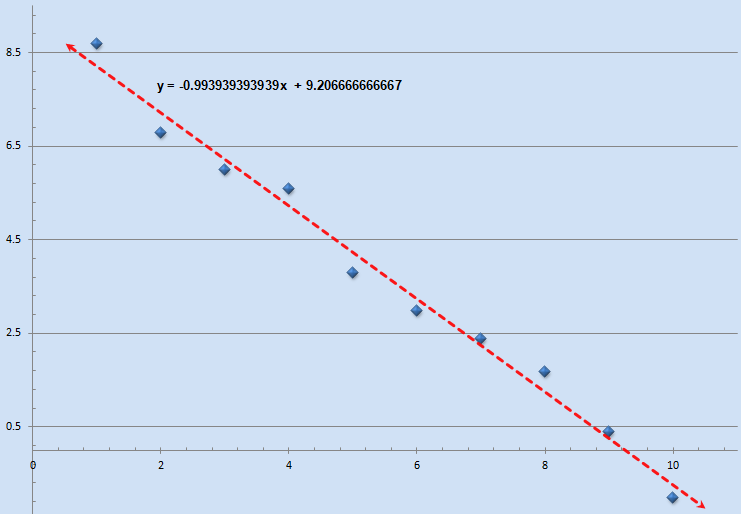
The following example attempts to compute a linear fit for a set
of 2D data points utilizing the Linear Least Squares
method. The data points are comprised of two vectors named x and y
plotted as blue on the chart, the result being a linear equation in
the form of y = β x + α which is depicted in red. The
example demonstrates the use of user defined vectors, vector operations
and aggregators and conditional statements.
[source: simple_example_16.cpp]
The following example will compute an approximate value for
π using the
Monte-Carlo method.
The example demonstrates the use of vector inequality operations, vector initialisation
via expressions, the vector size operator, the summation aggregator and user defined functions
for generating a uniformly distributed random value in the range [0,1).
[source: simple_example_17.cpp]
template<typename T>struct rnd_01 final:public exprtk::ifunction<T>{using exprtk::ifunction<T>::operator(); rnd_01(): exprtk::ifunction<T>(0){::srand(static_cast<unsignedint>(time(NULL)));}inline T operator()()override{// Note: Do not use this in production// Result is in the interval [0,1)return T(::rand()/ T(RAND_MAX +1.0));}};template<typename T>void monte_carlo_pi(){typedef exprtk::symbol_table<T> symbol_table_t;typedef exprtk::expression<T> expression_t;typedef exprtk::parser<T> parser_t;conststd::string monte_carlo_pi_program =" var samples[2 * 10^8] := [(rnd_01^2 + rnd_01^2) <= 1]; "" 4 * sum(samples) / samples[]; "; rnd_01<T> rnd01; symbol_table_t symbol_table; symbol_table.add_function("rnd_01",rnd01); expression_t expression; expression.register_symbol_table(symbol_table); parser_t parser; parser.compile(monte_carlo_pi_program,expression);const T approximate_pi = expression.value();const T real_pi = T(3.141592653589793238462643383279502);// or close enough...printf("pi ~ %20.17f\terror: %20.17f\n", approximate_pi,std::abs(real_pi - approximate_pi));}
The following example will open a file named 'file.txt' in write
mode, and write to the file a piece of text ten times, then finally close
the file. The following example demonstrates the ExprTk file I/O package
capabilities, handle manipulations, the null type, local string variables,
if-else statements and for-loops.
[source: simple_example_18.cpp]
template<typename T>void file_io(){typedef exprtk::symbol_table<T> symbol_table_t;typedef exprtk::expression<T> expression_t;typedef exprtk::parser<T> parser_t;conststd::string fileio_program =" var file_name := 'file.txt'; "" var stream := null; """" if (stream := open(file_name,'w')) "" println('Successfully opened file: ' + file_name); "" else "" { "" println('Failed to open file: ' + file_name); "" return [false]; "" }; """" var s := 'Hello world...'; """" for (var i := 0; i < 10; i += 1) "" { "" write(stream,s); "" }; """" if (close(stream)) "" println('Sucessfully closed file: ' + file_name); "" else "" { "" println('Failed to close file: ' + file_name); "" return [false]; "" } "; exprtk::rtl::io::file::package<T> fileio_package; exprtk::rtl::io::println<T> println; symbol_table_t symbol_table; symbol_table.add_function("println",println); symbol_table.add_package (fileio_package ); expression_t expression; expression.register_symbol_table(symbol_table); parser_t parser; parser.compile(fileio_program,expression);printf("Result %10.3f\n",expression.value());}
The following example illustrates a var-arg igeneric_function definition
that can handle two specific overloads. The first being a vector only,
the second being a vector and range (using two scalars)
input set. The function when invoked will populate the input vector
over the defined range with uniformly distributed pseudo-random values
in the range [0,1). The example expression takes a signal vector, then
proceeds to add a noise vector to the signal, resulting in a 'noisy-signal'.
Furthermore the resulting noisy signal's average as well as its element-wise
form is printed to stdout using a for-loop.
[source: simple_example_19.cpp]
template<typename T>class randu :public exprtk::igeneric_function<T>{public:typedeftypename exprtk::igeneric_function<T> igfun_t;typedeftypename igfun_t::parameter_list_t parameter_list_t;typedeftypename igfun_t::generic_type generic_type;typedeftypename generic_type::vector_view vector_t;using exprtk::igeneric_function<T>::operator(); randu(): exprtk::igeneric_function<T>("V|VTT")/* Overloads: 0. V - vector 1. VTT - vector, r0, r1 */{::srand(static_cast<unsignedint>(time(NULL)));}inline T operator()(conststd::size_t& ps_index, parameter_list_t parameters){ vector_t v(parameters[0]);std::size_t r0 =0;std::size_t r1 = v.size()-1;usingnamespace exprtk::rtl::vecops::helper;if((1== ps_index)&&!load_vector_range<T>::process(parameters, r0, r1,1,2,0))return T(0);for(std::size_t i = r0; i <= r1;++i){ v[i]= rnd();}return T(1);}private:inline T rnd(){// Note: Do not use this in production// Result is in the interval [0,1)return T(::rand()/ T(RAND_MAX +1.0));}};template<typename T>void vector_randu(){typedef exprtk::symbol_table<T> symbol_table_t;typedef exprtk::expression<T> expression_t;typedef exprtk::parser<T> parser_t;conststd::string vecrandu_program =" var noise[6] := [0]; """" if (randu(noise, 0, 5) == false) "" { "" println('Failed to generate noise'); "" return [false]; "" }; """" var noisy[noise[]] := signal + (noise - 1/2); """" for (var i := 0; i < noisy[]; i += 1) "" { "" println('noisy[',i,'] = ', noisy[i]); "" }; """" println('avg: ', avg(noisy)); """; T signal[]={ T(1.1), T(2.2), T(3.3), T(4.4), T(5.5), T(6.6), T(7.7)}; exprtk::rtl::io::println<T> println; randu<T> randu; symbol_table_t symbol_table; symbol_table.add_vector ("signal",signal); symbol_table.add_function("println", println); symbol_table.add_function("randu", randu ); expression_t expression; expression.register_symbol_table(symbol_table); parser_t parser; parser.compile(vecrandu_program,expression); expression.value();}
ExprTk provides the ability to catch and handle, at runtime, vector access and
processing violations. This is achieved by initially registering with the parser
a Vector Access Runtime Check (VARTC) handler
that subsequently is used to inject runtime checks into vector processing statements.
The following example demonstrates how a simple custom VARTC can be defined and
registered with a parser. The expression when evaluated will trigger an access
violation, the handler will attempt to determine which vector the violation occurred
on, and then print pertinent information to stdout.
[source: simple_example_20.cpp]
The following example computes the prices of European Call and Put options for a given strike price using the
Cox-Ross-Rubinstein
binomial option pricing model, and confirms the prices are somewhat arbitrage free by computing the
Put-Call parity.
The example demonstrates the use of vector processing, switch statements, user defined
and expression local variables, numerical constants, conditional statements, for-loop
structures, string comparisons and arithmetic functionality.
[source: simple_example_21.cpp]
template<typename T>void binomial_option_pricing_model(){typedef exprtk::symbol_table<T> symbol_table_t;typedef exprtk::expression<T> expression_t;typedef exprtk::parser<T> parser_t;const std::string european_option_binomial_model_program =" var dt := t / n; "" var z := exp(r * dt); "" var z_inv := 1 / z; "" var u := exp(v * sqrt(dt)); "" var u_inv := 1 / u; "" var p_up := (z - u_inv) / (u - u_inv); "" var p_down := 1 - p_up; """" var option_price[n + 1] := [0]; """" for (var i := 0; i <= n; i += 1) "" { "" var base_price := s * u^(n - 2i); """" option_price[i] := "" switch "" { "" case callput_flag == 'call' : max(base_price - k, 0); "" case callput_flag == 'put' : max(k - base_price, 0); "" }; "" }; """" for (var j := n - 1; j >= 0; j -= 1) "" { "" for (var i := 0; i <= j; i += 1) "" { "" option_price[i] := z_inv * "" (p_up * option_price[i] + p_down * option_price[i + 1]); "" } "" }; """" option_price[0]; "; T s = T(100.00);// Spot / Stock / Underlying / Base price T k = T(110.00);// Strike price T v = T(0.30);// Volatility T t = T(2.22);// Years to maturity T r = T(0.05);// Risk free rate T n = T(1000.00);// Number of time steps std::string callput_flag; symbol_table_t symbol_table; symbol_table.add_variable("s",s); symbol_table.add_variable("k",k); symbol_table.add_variable("t",t); symbol_table.add_variable("r",r); symbol_table.add_variable("v",v); symbol_table.add_constant("n",n); symbol_table.add_stringvar("callput_flag",callput_flag); expression_t expression; expression.register_symbol_table(symbol_table); parser_t parser; parser.compile(european_option_binomial_model_program,expression); callput_flag ="call";const T binomial_call_option_price = expression.value(); callput_flag ="put";const T binomial_put_option_price = expression.value();printf("BinomialPrice(call, %5.3f, %5.3f, %5.3f, %5.3f, %5.3f) = %10.6f\n", s, k, t, r, v, binomial_call_option_price);printf("BinomialPrice(put , %5.3f, %5.3f, %5.3f, %5.3f, %5.3f) = %10.6f\n", s, k, t, r, v, binomial_put_option_price);const T put_call_parity_diff =(binomial_call_option_price - binomial_put_option_price)-(s - k * std::exp(-r * t));printf("Put-Call parity difference: %20.17f\n", put_call_parity_diff);}
The following example calculates the implied volatility
of European Call and Put options for the same strike based on a given
target price using the Newton-Raphson method,
where the derivative of the option price with respect to its volatility will be its
Vega.
The example demonstrates the use of compositor functions, switch statements, conditional statements,
user defined and expression local variables and constant variables, numerical constants, string comparisons,
loop control structures, the ternary operator, inline statements, immutable symbol tables and arithmetic
functionality. [source: simple_example_22.cpp]
template<typename T>void compute_european_option_implied_volatility(){typedef exprtk::symbol_table<T> symbol_table_t;typedef exprtk::expression<T> expression_t;typedef exprtk::parser<T> parser_t;typedef exprtk::function_compositor<T> compositor_t;typedeftypename compositor_t::function function_t;conststd::string option_implied_volatility_program =" const var epsilon := 0.0000001; "" const var max_iters := 1000; """" var vola := 0.5; /* Initial volatility guess */ "" var itr := 0; """" while ((itr += 1) <= max_iters) "" { "" var price := "" switch "" { "" case callput_flag == 'call' : bsm_call(s, k, r, t, vola); "" case callput_flag == 'put' : bsm_put (s, k, r, t, vola); "" }; """" var price_diff := price - target_price; """" if (abs(price_diff) <= epsilon) "" { "" break; "" }; """" var vega := bsm_vega(s, k, r, t, vola); """" if (vega < epsilon) "" { "" itr := max_iters + 1; "" break; "" }; """" vola -= price_diff / vega; "" }; """" itr <= max_iters ? vola : null; "; T s = T(100.00);// Spot / Stock / Underlying / Base price T k = T(110.00);// Strike price T t = T(2.22);// Years to maturity T r = T(0.05);// Risk free rate T target_price = T(0.00);std::string callput_flag; symbol_table_t symbol_table(symbol_table_t::e_immutable); symbol_table.add_variable("s",s); symbol_table.add_variable("k",k); symbol_table.add_variable("t",t); symbol_table.add_variable("r",r); symbol_table.add_stringvar("callput_flag",callput_flag); symbol_table.add_variable ("target_price",target_price); symbol_table.add_pi(); compositor_t compositor(symbol_table); compositor.add( function_t("bsm_call").vars("s","k","r","t","v").expression(" var d1 := (log(s / k) + (r + v^2 / 2) * t) / (v * sqrt(t)); "" var d2 := d1 - v * sqrt(t); "" s * ncdf(d1) - k * exp(-r * t) * ncdf(d2); ")); compositor.add( function_t("bsm_put").vars("s","k","r","t","v").expression(" var d1 := (log(s / k) + (r + v^2 / 2) * t) / (v * sqrt(t)); "" var d2 := d1 - v * sqrt(t); "" k * exp(-r * t) * ncdf(-d2) - s * ncdf(-d1); ")); compositor.add( function_t("bsm_vega").vars("s","k","r","t","v").expression(" var d1 := (log(s / k) + (r + v^2 / 2) * t) / (v * sqrt(t)); "" s * exp(-d1^2 / 2) / sqrt(2pi) * sqrt(t); ")); expression_t expression; expression.register_symbol_table(symbol_table); parser_t parser; parser.compile(option_implied_volatility_program, expression);{ callput_flag ="call"; target_price = T(18.339502);const T call_option_implied_vol = expression.value();printf("Call Option(s: %5.3f, k: %5.3f, t: %5.3f, r: %5.3f) ""@ $%8.6f Implied volatility = %10.8f\n", s, k, t, r, target_price, call_option_implied_vol);}{ callput_flag ="put"; target_price = T(16.782764);const T put_option_implied_vol = expression.value();printf("Put Option(s: %5.3f, k: %5.3f, t: %5.3f, r: %5.3f) ""@ $%8.6f Implied volatility = %10.8f\n", s, k, t, r, target_price, put_option_implied_vol);}}
The following example will generate a specific waveform into the input vector, then proceed
to compute its Discrete Fourier Transform
placing it into the output vector. After which only significant frequency
bins (aka phasors) and their associated power amplitudes will be written to stdout. The example demonstrates
the use of compositor functions and symbol table embedding, user defined and expression local variables,
numerical constants, vector processing, loop control structures, RTL IO and arithmetic functionality.
[source: simple_example_23.cpp]
template<typename T>void real_1d_discrete_fourier_transform(){typedef exprtk::symbol_table<T> symbol_table_t;typedef exprtk::expression<T> expression_t;typedef exprtk::parser<T> parser_t;typedef exprtk::function_compositor<T> compositor_t;typedeftypename compositor_t::function function_t;const T sampling_rate =1024.0;// ~1KHzconst T N =8* sampling_rate;// 8 seconds worth of samplesstd::vector<T> input (static_cast<std::size_t>(N),0.0);std::vector<T> output(static_cast<std::size_t>(N),0.0); exprtk::rtl::io::println<T> println; symbol_table_t symbol_table; symbol_table.add_vector ("input", input ); symbol_table.add_vector ("output", output ); symbol_table.add_function ("println", println ); symbol_table.add_constant ("N", N ); symbol_table.add_constant ("sampling_rate", sampling_rate); symbol_table.add_pi(); compositor_t compositor(symbol_table); compositor.load_vectors(true); compositor.add( function_t("dft_1d_real").var("N").expression(" for (var k := 0; k < N; k += 1) "" { "" var k_real := 0.0; "" var k_imag := 0.0; """" for (var i := 0; i < N; i += 1) "" { "" var theta := 2pi * k * i / N; "" k_real += input[i] * cos(theta); "" k_imag -= input[i] * sin(theta); "" }; """" output[k] := hypot(k_real,k_imag); "" } "));conststd::string dft_program =""" /* "" Generate an aggregate waveform comprised of three "" sine waves of varying frequencies and amplitudes. "" */ "" const var num_waves := 3; """" var frequencies[num_waves] := { 111.125, 222.250, 333.375 }; /* Hz */ "" var amplitudes [num_waves] := { 11.111, 22.222, 33.333 }; /* Power */ """" for (var i := 0; i < N; i += 1) "" { "" var time := i / sampling_rate; """" for (var j := 0; j < frequencies[]; j += 1) "" { "" var frequency := frequencies[j]; "" var amplitude := amplitudes [j]; "" var theta := 2 * pi * frequency * time; """" input[i] += amplitude * sin(theta); "" } "" }; """" dft_1d_real(input[]); """" var freq_bin_size := sampling_rate / N; "" var max_bin := ceil(N / 2); "" var max_noise_level := 1e-6; """" /* Normalise amplitudes */ "" output /= max_bin; """" println('1D Real DFT Frequencies'); """" for (var k := 0; k < max_bin; k += 1) "" { "" if (output[k] > max_noise_level) "" { "" var freq_begin := k * freq_bin_size; "" var freq_end := freq_begin + freq_bin_size; """" println('Index: ', k,' ', "" 'Freq. range: [', freq_begin, 'Hz, ', freq_end, 'Hz) ', "" 'Amplitude: ', output[k]); "" } "" } """; expression_t expression; expression.register_symbol_table(symbol_table); parser_t parser; parser.compile(dft_program,expression); expression.value();}
The following example will evaluate single digit number based Reverse Polish Notation
expressions. The example demonstrates the use of igeneric_function, string ranges,
loop control structures, user defined and expression local variables, switch statements
and general arithmetic functionality.
[source: simple_example_24.cpp]
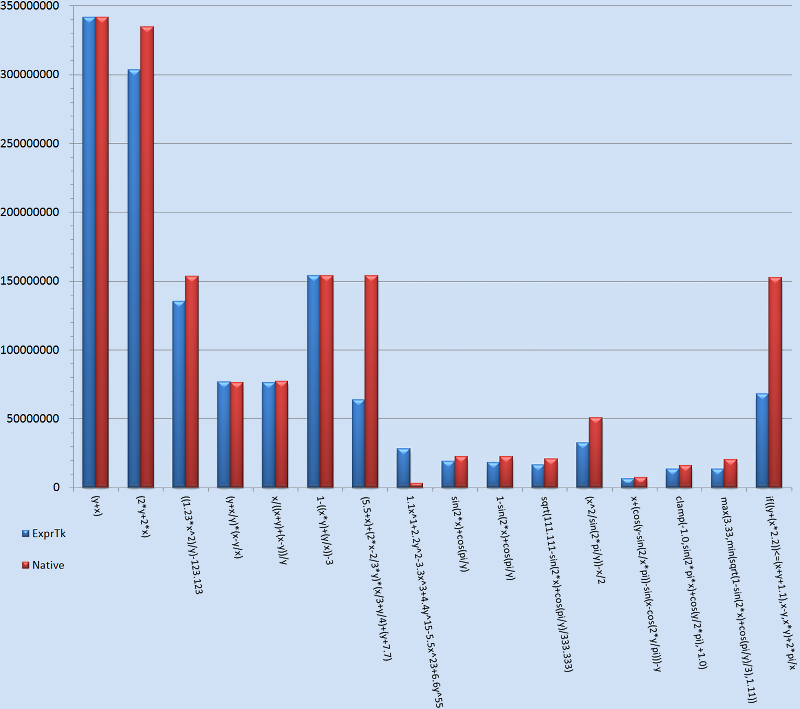
The chart below depicts the rate of expression evaluations per
second for an assortment of expressions.
Each expression is specialised upon the 'double' floating point
type and comprised of two variables that are varied before each
expression evaluation. The expressions are evaluated in two
modes: ExprTk compiled and native optimised.
The benchmark itself was compiled using GCC 7.2 with O3, LTO, PGO
and native architecture target compiler settings, and executed upon
an Intel Xeon E5-2687W 3GHz CPU, 64GB RAM, Ubuntu 17.10 with kernel
4.10 system.
Source: exprtk_benchmark.cpp
The following is a benchmark based on Example 15.
The BSM option pricing model is executed using native and ExprTk based implementations.
There are two ExprTk implementations, vanilla and another where e(...)
is replaced with the equivalent and much faster exp(...) function and also repeated
sub-calculations are cached locally. The benchmark depicts the number of pricing
calculations per second. The benchmark itself was compiled using GCC 7.2 with O3,
LTO, PGO and native architecture target compiler settings, and executed upon an
Intel Xeon E5-2687W 3GHz CPU, 64GB RAM, Ubuntu 17.10 with kernel 4.10 system.
Source: exprtk_bsm_benchmark.cpp
The following is a list of facts and suggestions one may want to take
into account when using ExprTk:
Note 00:
Precision and performance of expression evaluations are the
dominant principles of the ExprTk library.
Note 01:
ExprTk uses a rudimentary imperative programming model with
syntax based on languages such as Pascal and C. Furthermore
ExprTk is an LL(2)
type grammar and is processed using a recursive descent parsing
algorithm.
Note 02:
Supported types are float, double, long double and MPFR/GMP.
Generally any user defined numerical type that supports all the
basic floating point arithmetic operations: -, +, *, /, ^, % etc;
unary and binary operations: sin, cos, min, max, equal etc and any
other ExprTk dependent operations can be used to specialise the
various components: expression, parser and symbol_table.
Note 03:
Standard arithmetic operator precedence is applied (BEDMAS).
In general C, Pascal or Rust equivalent unary, binary, logical and
equality/inequality operator precedence rules apply. eg:
                             a == b and c > d + 1  --->  (a == b) and (c > (d + 1))

                             x - y <= z / 2        --->  (x - y) <= (z / 2)

                             a - b / c * d^2^3     --->  a - ((b / c) * d^(2^3))
Note 04:
Results of expressions that are deemed as being 'valid' are to
exist within the set of Real numbers. All other results will be
of the value: Not-A-Number (NaN).
However this may not necessarily be a requirement for user defined
numerical types, eg: complex number type.
Note 05:
Supported user defined types are numeric and string
variables, numeric vectors and functions.
Note 06:
All reserved words, keywords, variable, vector, string and
function names are case-insensitive.
Note 07:
Variable, vector, string variable and function names must begin
with a letter (A-Z or a-z), then can be comprised of any combination
of letters, digits, underscores and non-consecutive dots, ending in
either a letter (A-Z or a-z), digit or underscore. (eg: x, y2, var1,
power_func99, person.age, item.size.0). The associated regex pattern
is: [a-zA-Z][a-zA-Z0-9_]*(\.[a-zA-Z0-9_]+)*
Note 08:
Expression lengths and sub-expression lists are limited only by
storage capacity.
Note 09:
The life-time of objects registered with or created from a
specific symbol-table must span at least the lifetime of the
symbol table instance and all compiled expressions which
utilise objects, such as variables, strings, vectors, function
compositor functions and functions of that symbol-table,
otherwise the result will be undefined behaviour.
Note 10:
Equal and not_equal are normalised-epsilon equality routines,
which use epsilons of 0.0000000001 and 0.000001
for double and float types respectively.
Note 12:
Expressions may contain white-space characters such as space,
tabs, new-lines, control-feed et al.
('\n', '\r', '\t', '\b', '\v', '\f')
Note 13:
Strings may be comprised of any combination of letters, digits
special characters including (~!@#$%^&*()[]|=+ ,./?<>;:"`~_) or
hexadecimal escaped sequences (eg: \0x30) and must be enclosed
with single-quotes.
eg: 'Frankly my dear, \0x49 do n0t give a damn!'
Note 14:
User defined normal functions can have up to 20 parameters,
where as user defined generic-functions and vararg-functions
can have an unlimited number of parameters.
Note 15:
The inbuilt polynomial functions can be at most of degree 12.
Note 16:
Where appropriate constant folding optimisations may be applied.
(eg: The expression '2 + (3 - (x / y))' becomes '5 - (x / y)')
Note 17:
If the strength reduction compilation option has been enabled,
then where applicable strength reduction optimisations may be
applied.
Note 18:
String processing capabilities are available by default. To
turn them off, the following needs to be defined at compile
time: exprtk_disable_string_capabilities
Note 19:
Composited functions can call themselves or any other functions
that have been defined prior to their own definition.
Note 20:
Recursive calls made from within composited functions will have
a stack size bound by the stack of the executing architecture.
Note 21:
User defined functions by default are assumed to have side
effects. As such an "all constant parameter" invocation of such
functions wont result in constant folding. If the function has
no side-effects then that can be noted during the constructor
of the ifunction allowing it to be constant folded where
appropriate.
Note 22:
The entity relationship between symbol_table and an expression
is many-to-many. However the intended 'typical' use-case where
possible, is to have a single symbol table manage the variable
and function requirements of multiple expressions.
Note 23:
The common use-case for an expression is to have it compiled
only ONCE and then subsequently have it evaluated multiple
times. An extremely inefficient and suboptimal approach would
be to recompile an expression from its string form every time
it requires evaluating.
Note 24:
It is strongly recommended that the return value of method
invocations from the parser and symbol_table types be taken
into account. Specifically the 'compile' method of the parser
and the 'add_xxx' set of methods of the symbol_table as they
denote either the success or failure state of the invoked call.
Continued processing from a failed state without having first
rectified the underlying issue will in turn result in further
failures and undefined behaviours.
Note 25:
The following are examples of compliant floating point value
representations:
12345
-123.456
+123.456e+12
123.456E-12
+012.045e+07
.1234
1234.
-56789.
123.456f
-321.654E+3L
Note 26:
Expressions may contain any of the following comment styles:
// .... \n
# .... \n
/* .... */
Note 27:
The 'null' value type is a special non-zero type that
incorporates specific semantics when undergoing operations with
the standard numeric type. The following is a list of type and
boolean results associated with the use of 'null':
null +,-,*,/,% x --> x
x +,-,*,/,% null --> x
null +,-,*,/,% null --> null
null == null --> true
null == x --> true
x == null --> true
x != null --> false
null != null --> false
null != x --> false
Note 28:
The following is a list of reserved words and symbols used by
ExprTk. Attempting to add a variable or custom function to a
symbol table using any of the reserved words will result in a
failure.
                          abs, acos,  acosh, and,  asin, asinh,  assert, atan,  atanh,
                          atan2, avg, break, case, ceil, clamp, continue, const,  cos,
                          cosh,  cot,  csc, default,  deg2grad,  deg2rad, equal,  erf,
                          erfc, exp, expm1, false, floor, for, frac, grad2deg,  hypot,
                          iclamp,  if, else,  ilike, in,  inrange, like,  log, log10,
                          log2,  logn, log1p,  mand, max,  min, mod,  mor, mul,  ncdf,
                          nand, nor, not, not_equal,  null, or, pow, rad2deg,  repeat,
                          return, root, round, roundn, sec, sgn, shl, shr, sin,  sinc,
                          sinh,  sqrt,  sum,  swap, switch,  tan,  tanh,  true, trunc,
                          until, var, while, xnor, xor
Note 29:
Every valid ExprTk statement is a "value returning" expression.
Unlike some languages that limit the types of expressions that
can be performed in certain situations, in ExprTk any valid
expression can be used in any "value consuming" context. eg:
var y :=3;for(var x :=switch{case1:7;case2:-1+~{var x{};};default: y >2?3:4;}; x !=while(y >0){ y -=1;}; x -={if(min(x,y)<2*max(x,y)) x +2;else x + y -3;}){(x + y)/(x - y);};
Note 30:
It is recommended when prototyping expressions that the
ExprTk REPL
be utilised, as it supports all the features available in
the library, including complete error analysis, benchmarking
and dependency dumps etc which allows for rapid
coding/prototyping and debug cycles without the hassle of
having to recompile test programs with expressions that have
been hard-coded. It is also a good source of truth for how the
library's various features can be applied.
Note 31:
For performance considerations, one should assume the actions
of expression, symbol table and parser instance instantiation
and destruction, and the expression compilation process itself
to be of high latency. Hence none of them should be part of any
performance critical code paths, and should instead occur
entirely either before or after such code paths.
Note 32:
Deep copying an expression instance for the purposes of
persisting to disk or otherwise transmitting elsewhere with the
intent to 'resurrect' the expression instance later on is not
possible due to the reasons described in the final note of
Section 10. The recommendation is to instead simply persist the
string form of the expression and compile the expression at
run-time on the target.
Note 33:
The correctness and robustness of the ExprTk library is
maintained by having a comprehensive suite of unit tests and
functional tests all of which are run using sanitizers (ASAN,
UBSAN, LSAN, MSAN, TSAN). Additionally, continuous fuzz-testing
provided by Google OSS Fuzz,
and static analysis via
Synopsys Coverity.
Note 34:
The library name ExprTk is pronounced "Ex-Pee-Ar-Tee-Kay" or simply
"Mathematical Expression Toolkit".
Note 35:
Before jumping in and using ExprTk, do take the time to peruse
the documentation and all of the examples, both in the main and
the extras distributions. Having an informed general view of
what can and can't be done, and how something should be done
with ExprTk, will likely result in a far more productive and
enjoyable programming experience.


 C++ Mathematical Expression Library Source Code and Examples
 ExprTk CMake Solution
 ExprTk MSVC Solutions (2010, 2013, 2015, 2017, 2019, 2022)


 Linux
Linux  Windows 64-bit
 Online ExprTk REPL